productos

Serie libre de fus

S-Multi

S-Multi

FusFree™ S-Multi Quick-Remove Support Material can achieve fast and easy peeling by adjusting the bonding strength to the support surface of the body material and the bonding strength of S-Multi itself. S-Multi Quick-Remove Support Material does not
- HDT-A / degC
- HDT-B / degC
- Young's Modulus / MPa
- Tensile Strength / MPa
Diameter1.75mm Weight2.5kg / 3kg
Spool Info
  • Specifications
  • Print profile downloads
  • Parámetros de impresión
  • Related downloads
  • Application cases
  • FAQ
  • Health tips
  • Moisture handling & storage
  • Application disclaimer
  • Statements & copyright
cargando características funcionales del material (tabla de propiedades físicas en comparación con radar)... / Loading filament properties & radar…
PRODUCT PARAMETERS V2

FusFree™ S-Multi

Synced from Product Parameters V2: Basic & Appearance

Product Name FusFree™ S-Multi
Product Model S-Multi
Forming Process Filamento Compatible con FDM
Color / Appearance 纯色(Natural)、黑色(Black)
Package Weight 2.5 kg / 3 kg
Filament Diameter 1.75 mm
Brand FusRock
Supplier FusRock

Material Properties

*Recommended printing conditions

Printing Tips

Printing Tips:S-Multi very easy to absorb moisture within the environment, and printing after absorbing moisture will result ozzing, extruding with bubbles and rough surface appearance, thus reducing print quality. It is recommended that put the filament into a dry box (humidity below 15%) immediately after opening the  S-Multi vacuum foil bag for printing. Please put the unused filament back into the original aluminum foil bag for sealed storage.After the material is damp, there will be more printing ozzing, bubbles extruded and rough printing surface. Please dry the filament in an oven at 80-100℃ for 4-6h to restore the printing quality of  S-Multi.It is recommended to use hardened steel and above grade nozzles made by Phaetus, which can effectively improve the print quality. Besides, it is recommended that the thickness of the heating block is longer 12mm.In dual-extruder printing mode, the material in the standby nozzle will deteriorate due to prolonged heating, and the deteriorated material needs to be squeezed out before the print nozzle is switched, so it is necessary to use the Wipe wall or Wipe tower function in the slicing software.After the printing is completed, the pri

  • Document type
  • Version
  • Time
  • Action
  • TDS
  • 4.1
  • 2025-01-01
  • No matching print profile files.

    PRODUCT PARAMETERS V2

    Parámetros de impresión

    Valores sincronizados desde el perfil de producto V2 vinculado; punto de partida para el slicing y pruebas de impresión.

    Printing Window

    Core temperature, speed and cooling settings from Product Parameters V2.

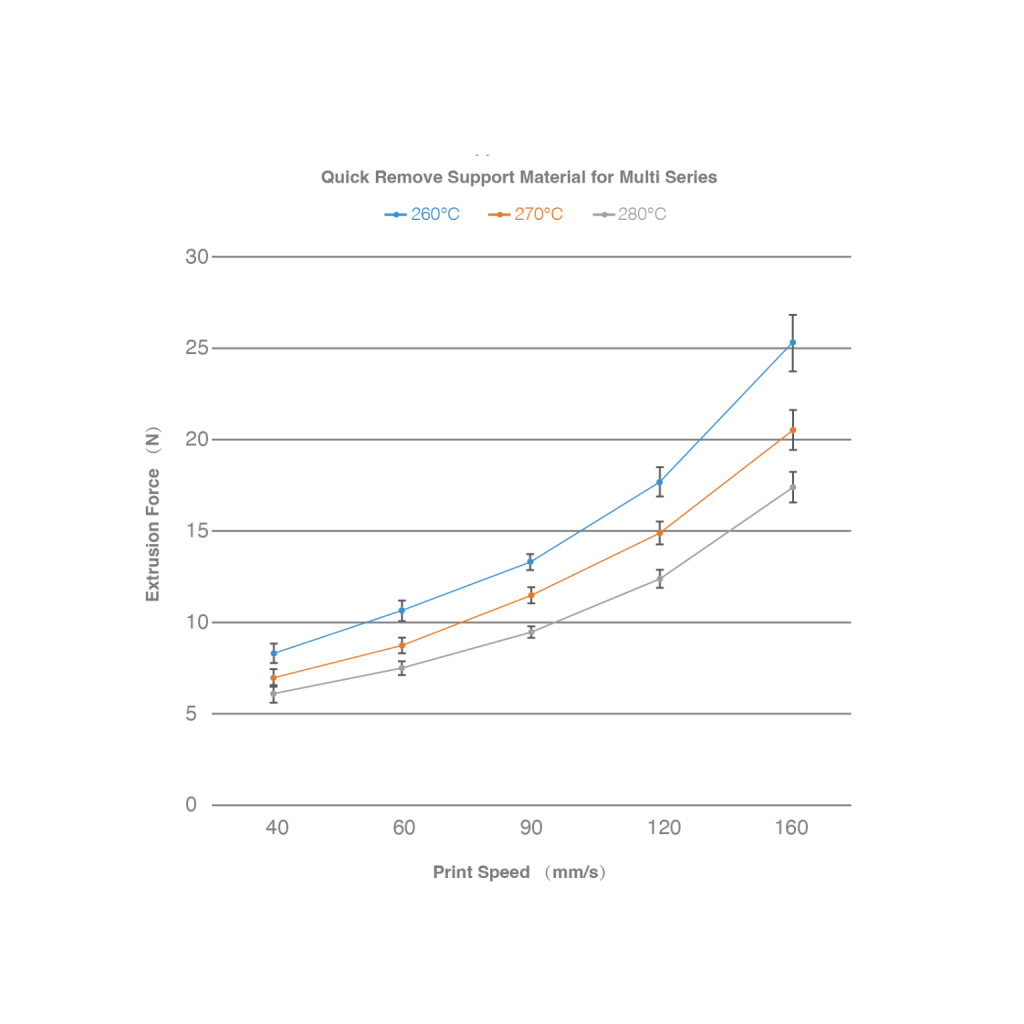
    Nozzle Temperature 260 - 280 °C
    Bed Temperature 70 - 90 °C
    Print Speed 30 - 120 mm/s
    Suggested Nozzle 0.4 - 1 mm

    Hardware & Platform

    Nozzle, build plate and pre-print preparation recommendations.

    Nozzle Material Se recomienda utilizar acero endurecido y boquilpor encima de la ley
    Build Plate Material Recubrimiento con pegpvp
    Enclosure Printing No requiere recinto. Si utiliza una impresora adjunta, active la ventilación de la cámara para evitar la obstrucción de la boquilla.

    Support & Compatibility

    Support material, spacing and compatible material recommendations.

    Retraction 0.6 - 2 mm
    Retraction Speed 30 - 60 mm/s
    Support Density 15 - 20 %
    Support Dense Layer Thickness 3 - 5 mm
    Support XY Distance 0.3 - 0.6 mm
    Support Border Loops 1 loops

    Notes

    Additional guidance maintained in Product Parameters V2.

    Other Suggestions FusFree™ S-Multi muy fácil de absorber la humedad en el medio ambiente, y la impresión después de absorber la humedad dará lugar a oz, extrucon burbujas y apariencia de superficie áspera, reduciendo así la calidad de impresión. Se recomienda colocar el filamento en una caja seca (humedad inferior al 15%) inmediatamente después de abrir la bolsa de lámina al vacío FusFree™ S-Multi para imprimir. Por favor, vuelva a colocar el filamento sin usar en la bolsa de papel aluminio original para un almacenamiento sellado. Después de que el material está húmedo, habrá más ozzing impresión, burbujas extruy superficie de impresión rugo. Por favor, seque el filamento en un horno a 80-100℃ para 4-6h para restaurar la calidad de impresión de FusFree™ S-Multi. Se recomienda el uso de acero endurecido y boquilde de Phaetus, que pueden mejorar efectivamente la calidad de impresión. Además, se recomienda que el espesor del bloque calefactor sea más largo 12mm. En el modo de impresión de doble extrusora, el material en la boquilla de espera se deteriordebido al calentamiento prolongado, y el material deteriordebe ser exprimifuera antes de que la boquilla de impresión se cambie, por lo que es necesario utilizar la función de limpiar pared o torre de limpiar en el software de corte. Una vez terminada la impresión, se puede recocer la pieza impresa y realizar el paso de remofusfree ™ S-Multi. Durante el proceso de recocido, FusFreeTM S-Multi puede desempeñar el papel de apoyar el material del cuerpo, reducir la deformación dimensional del material del cuerpo y mejorar las propiedades mecánicas del material del cuerpo. Recorecocondiciones: establecido de acuerdo con los requisitos del material del cuerpo.

    No solution entries for this product yet.

    No FAQs for this product yet.

    通用安全提示(FusRock)

    1. 长期大量使用 3D 打印材料时,建议在专用房间操作并保持通风。
    2. 有过敏史者请确认所用材质不会引发过敏反应。
    3. 有呼吸道慢性病者请佩戴口罩;其他人员也强烈建议操作时佩戴口罩。
    4. 对纤维类打印件进行打磨、切割等可能产生纤维逸出的操作时,请做好防护,避免刺入或吸入。
    5. 打印时请远离儿童与婴幼儿,注意环境安全。

    Storage (moisture protection)

    Short breaks Store in a sealed dry box or apply a simple vacuum pack; avoid direct sunlight.
    Long-term storage Return filament to the factory foil bag, squeeze out air (add a fresh desiccant pack if available), then place inside a household vacuum bag and pull vacuum. Keep in a cool, dry place away from sunlight.
    Drying damp filament — guidelines
    Drying parameters

    PTC compact dryer box: 60–70 °C for 4–6 hours.

    Small lab oven (forced-air): temperature uniformity is often limited; spools can warp. Reduce temperature/time (example: 40–45 °C for ~4 hours) and cross-check the material-specific drying notes in the datasheet.

    Important: if print quality does not improve, test with an empty spool before raising temperature—non-uniform heat can deform plastic flanges.

    Large forced-air oven: 60–70 °C for 4–6 hours.

    PS: Why do devices differ? Add an internal article or external link (“learn more”).

    Precautions

    Read before drying

    1. When in doubt, run an empty-spool temperature trial before increasing heat.
    2. Follow the recommended temperatures/times from the product / material admin page.
    3. Prefer forced-air ovens; do not blast the spool directly with hot air.
    4. Avoid exposing the spool edge to a violent air jet.
    5. Do not rest spools only on wire racks—use a flat heat-spreading plate if needed.
    6. Hot spools can burn—use gloves.
    7. Observe fire and electrical safety.
    8. Avoid microwave ovens or other uneven heaters; a temperature-controlled drying oven is preferred.

    (Insert “warped vs normal” spool photos here.)

    Dry vs damp

    What moisture does to prints

    DryDamp
    Cleaner surface, stable color, mechanical properties on specPitting, stringing, whitening, weaker properties (material dependent)

    (Optional: 1 / 2 / 3 day exposure at ~80% RH — same test part.)

    * Example photos may reference a specific grade (e.g. PAHT-CF); label yours accordingly.

    Contact form

    Enviar